
Meta tester insructions
1. Log In to Inkie
-
Go to app.inkie.ink
-
Sign in using the provided credentials (sophieinkie@gmail.com Gmail account)
-
You'll land on the Inkie dashboard
.png)
2. Connect a Meta Account
-
Tap the hamburger menu (top right)
-
Select Connect Socials → Meta
-
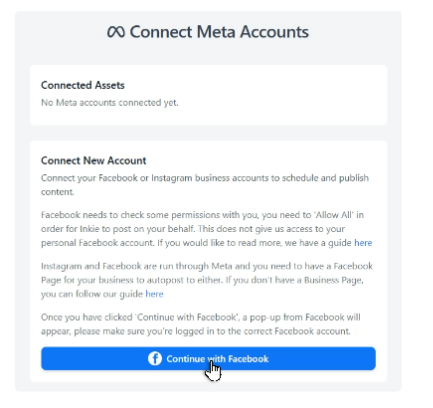
On the Connect Meta Accounts page, click the blue Continue with Facebook button
-
Enter the provided sophieinkie@gmail.com Facebook login credentials (username, password, and 2FA auth codes)
-
Complete the two-factor authentication



3. Select Pages & Permissions
-
Once logged in, you'll see the sophieinkie Business Portfolio and the inkie.test Instagram account
-
Select the Inkie Test Facebook page
-
Click Next
Review the requested permissions and click Confirm


4. Activate the Connected Accounts
-
You'll be redirected back to Inkie, where both Inkie Test Facebook Page and inkie.test Instagram account are now visible
-
Toggle both accounts on so content can be created with them
-
Set the time zone (e.g. London, UK)
Hit Save - you'll return to the dashboard

** Permissions demonstrated at this stage:
-
pages_show_list - pulls out Facebook pages from the business management account
-
instagram_basic - pulls out the linked Instagram account
-
business_management - we connected to sophieinkie business portfolio
5. Create & Publish a Post
-
Tap the hamburger menu (top right) and select Content Timeline
-
In the content planner, roll over any date that is today or in the future
-
Click Add Post
-
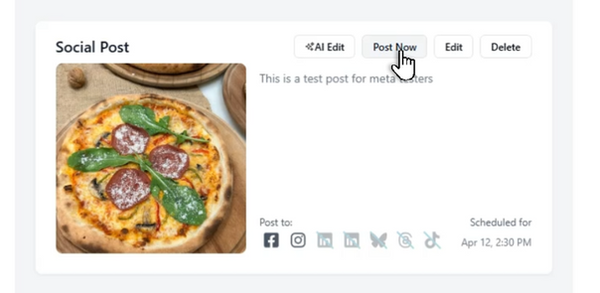
Enter a caption (e.g. "This is a test post for Meta Testers")
-
Click Save on the caption
-
Click Add an Image and search for an image (e.g. "pizzas")
-
Select an image
-
Confirm that both Facebook and Instagram are enabled as target platforms
Click Post Now (or schedule for a future time)


6. Verify the Published Post
-
Open Instagram - refresh the feed and confirm the post appears on the inkie.test account:
https://www.instagram.com/inkie.test -
Open the Inkie Test Facebook page - confirm the same post appears there

Permissions demonstrated at this stage:
-
pages_manage_posts - publishing content to the Facebook page
-
pages_read_engagement - reading post engagement data
-
instagram_content_publish - publishing content to the Instagram account